
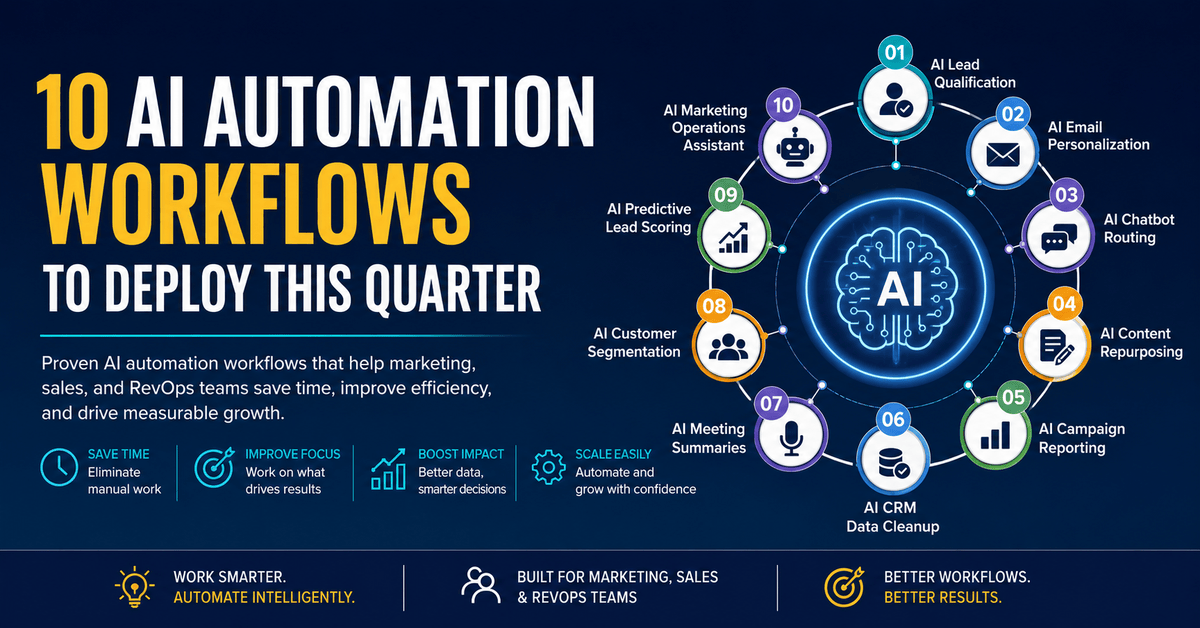
AI Automation for Marketing Teams: 10 Workflows to Deploy This Quarter
Table of Contents
- Introduction
- What is AI Automation?
- Why Marketing Teams Need AI Automation
- 10 AI Automation Workflows to Deploy This Quarter
- AI Tools Comparison Table
- Best Practices for AI Automation
- Common Mistakes to Avoid
- AI Automation Roadmap: A Quarter-by-Quarter Plan
- ROI Measurement Framework
- Future Trends in AI Marketing Automation
- Conclusion
- FAQs
Blog Summary
This guide breaks down ten AI automation workflows that B2B marketing and RevOps teams can realistically deploy within a single quarter — covering lead qualification, personalization, chatbot routing, content repurposing, reporting, CRM hygiene, and predictive scoring. It includes a tool comparison table, a governance checklist, a rollout roadmap, and an ROI framework so teams can move from experimentation to measurable, enterprise-ready automation.
Introduction
Customer expectations are rising faster than most marketing teams can staff for. Buyers want a personalized response within minutes, not days, and they expect every touchpoint — email, chat, ads, and sales follow-up — to feel like it was built specifically for them.
At the same time, marketing headcount hasn’t grown at the same pace as the workload. Teams are being asked to produce more content, run more campaigns, and report on more channels with roughly the same number of people.
AI automation is how growth-focused teams are closing that gap. Instead of replacing marketers, it’s absorbing the repetitive, data-heavy work — lead scoring, CRM updates, first-draft content, reporting — so people can focus on strategy, messaging, and relationships. Done well, it also tightens RevOps alignment, because AI systems can push consistent, structured data between marketing, sales, and customer success in real time.
This article walks through ten specific workflows you can put into production this quarter, the tools that power them, and a framework for measuring whether they’re actually working.
What is AI Automation?
AI automation combines traditional rules-based automation with machine learning and generative AI so that a workflow can make judgment calls, not just follow a fixed script. A conventional automation tool moves a lead from stage A to stage B when a condition is met. An AI automation layer decides whether that lead is worth moving, drafts the follow-up message, and flags the right rep — without a human writing the rule in advance.
| Traditional Automation | AI Automation |
| Executes fixed, pre-defined rules | Interprets context and makes judgment-based decisions |
| Requires manual updates as conditions change | Learns from new data and adjusts over time |
| Good for repetitive, structured tasks | Good for unstructured tasks: writing, scoring, summarizing |
| Example: send email on form submit | Example: score the lead, personalize the email, and route it |
Common benefits reported by teams that adopt AI automation include faster lead response times, more consistent CRM data, and content teams that can repurpose one asset into five formats in the time it used to take to produce one. Platforms like HubSpot, Salesforce, and Microsoft Copilot now build these capabilities directly into their core products, which is part of why adoption has accelerated so quickly among B2B teams.
Why Marketing Teams Need AI Automation
Most marketing organizations aren’t short on strategy — they’re short on execution bandwidth. A few recurring pressure points show up across nearly every team we work with:
- Manual, repetitive work: updating spreadsheets, tagging leads, formatting reports.
- Content production bottlenecks: one piece of long-form content needs to become social posts, emails, and ad copy, but there’s no time to rebuild it five different ways.
- Inconsistent lead qualification: reps chase leads that were never sales-ready, while warm leads sit untouched.
- Messy CRM data: duplicate records and missing fields quietly break attribution and reporting.
- Reporting that eats a full day: pulling data from five platforms into one deck, every single week.
- Campaigns that optimize too slowly: by the time a human notices underperformance, budget has already been wasted.
Each of these is a candidate for AI automation — not because AI is trendy, but because each one is a high-volume, pattern-based task that a model can learn to handle consistently.
10 AI Automation Workflows to Deploy This Quarter
These workflows are ordered roughly by ease of implementation, so teams new to AI automation can start at the top and build toward the more advanced ones.
- AI Lead Qualification
| Business challenge | Reps waste time on leads that were never going to convert. |
| Tools | HubSpot AI, Salesforce Einstein, Clearbit, Zapier AI |
| Workflow steps | Lead submits form → enrichment tool appends firm data → AI model scores fit and intent → CRM auto-tags and routes to the right rep or nurture track |
| Suitable teams | Demand generation, SDR/BDR teams |
| Expected impact | Faster first response on high-fit leads and fewer wasted sales touches |
Implementation tip: start with 3–4 firmographic and behavioral signals rather than twenty; overloading the scoring model early makes it harder to audit later.
Common mistake: letting the AI score run with no human-reviewed sample checks — scoring drift is easy to miss until pipeline quality has already dropped.
- AI Email Personalization
| Business challenge | Segment-of-one personalization isn’t feasible to write by hand at scale. |
| Tools | ChatGPT/Claude via API, HubSpot AI, Mailchimp AI |
| Workflow steps | CRM segment triggers a prompt template → AI drafts subject line and body variants using account/behavior data → marketer reviews and approves → send |
| Suitable teams | Lifecycle marketing, ABM |
| Expected impact | Higher open and reply rates on nurture and ABM sequences |
Suggested prompt: “Using [account name], [industry], and [most recent product page visited], write a 3-sentence personalized email opening that references their likely priority this quarter.”
Common mistake: sending AI-drafted emails without a human review pass — tone and factual accuracy still need a marketer’s eye.
- AI Chatbot Routing
| Business challenge | Website visitors leave when they can’t get a fast, relevant answer. |
| Tools | Intercom AI, Drift, HubSpot Chatflows, Microsoft Copilot Studio |
| Workflow steps | Visitor opens chat → AI classifies intent (support, sales, pricing) → answers directly from a knowledge base or routes to the correct queue with context attached |
| Suitable teams | Marketing ops, customer success |
| ROI | Fewer missed conversations and shorter time-to-first-response outside business hours |
Implementation tip: feed the bot your actual FAQ and pricing objection library — generic training data produces generic, unhelpful answers.
- AI Content Repurposing
| Business challenge | Long-form content rarely gets reformatted for other channels. |
| Tools | Claude, ChatGPT, Jasper, Descript (for video/audio) |
| Workflow steps | Publish a webinar or blog → AI extracts key points → generates LinkedIn posts, an email digest, and short video captions → team schedules via a social tool |
| Suitable teams | Content marketing, social media |
| Example | One 2,000-word blog becomes five social posts and one nurture email in under 30 minutes |
- AI Campaign Reporting
| Business challenge | Weekly reporting pulls data manually from too many platforms. |
| Tools | Zapier AI, Make, HubSpot Reporting AI, Google Looker Studio |
| Workflow steps | Automation pulls metrics from ad platforms and CRM → AI summarizes performance in plain language → auto-generates a weekly digest for stakeholders |
| Suitable teams | Marketing ops, leadership reporting |
| Expected impact | Hours saved per week and faster identification of underperforming campaigns |
- AI CRM Data Cleanup
| Business challenge | Duplicate and incomplete records quietly break attribution. |
| Tools | HubSpot AI, Salesforce Einstein, Insycle, Zapier AI |
| Workflow steps | AI scans records nightly → flags duplicates and missing fields → auto-fills from enrichment data → routes edge cases to ops for review |
| Suitable teams | RevOps, marketing operations |
| ROI | Cleaner attribution and more reliable segmentation for every downstream campaign |
- AI Meeting Summaries
| Business challenge | Sales and customer calls generate insights that never make it back to marketing. |
| Tools | Microsoft Copilot, Gong, Otter.ai, Zoom AI Companion |
| Workflow steps | Call is recorded → AI transcribes and summarizes → key objections and requests are tagged → summary pushed to CRM and shared with marketing |
| Suitable teams | Sales enablement, product marketing |
| Example | Recurring objections surfaced from call summaries directly inform new FAQ and landing page copy |
- AI Customer Segmentation
| Business challenge | Static segments (industry, company size) miss behavioral signals that predict intent. |
| Tools | HubSpot AI, Salesforce Einstein, n8n + a data warehouse |
| Workflow steps | AI clusters contacts by engagement, firmographic, and product-usage data → segments refresh automatically → campaigns pull from live segments instead of static lists |
| Suitable teams | Lifecycle marketing, ABM |
| Expected impact | More relevant campaign targeting without manual list maintenance |
- AI Predictive Lead Scoring
| Business challenge | Rules-based scoring doesn’t adapt as buying behavior changes. |
| Tools | Salesforce Einstein, HubSpot Predictive Lead Scoring, 6sense |
| Workflow steps | Model trains on historical closed-won/closed-lost data → scores new leads on likelihood to convert → score updates as new behavior comes in |
| Suitable teams | RevOps, sales leadership |
| ROI | Sales time reallocated toward the accounts most likely to close |
Common mistake: training the model on too small or too old a dataset — predictive scoring needs a meaningful volume of recent closed deals to be reliable.
- AI Marketing Operations Assistant
| Business challenge | Marketing ops fields the same recurring requests: campaign setup, list pulls, asset requests. |
| Tools | Microsoft Copilot, Claude, custom internal agent built on an LLM API |
| Workflow steps | Team member submits a request in Slack/Teams → AI assistant interprets the request → executes routine tasks or drafts the deliverable → escalates anything ambiguous to a human |
| Suitable teams | Marketing operations, RevOps |
| Expected impact | Fewer routine tickets reaching ops, freeing time for higher-value systems work |
AI Tools Comparison Table
| Tool | Best For | Pricing | Strengths | Weaknesses | Ideal Team Size |
| ChatGPT | Content drafting, general-purpose AI tasks | Free–$25+/user/mo | Fast, flexible, widely integrated | Needs prompt discipline for brand voice | Any |
| Claude | Long-form content, analysis, structured writing | Free–$20+/user/mo | Strong reasoning, handles long documents well | Smaller plugin ecosystem than some rivals | Any |
| HubSpot AI | All-in-one marketing + CRM automation | Bundled with HubSpot tiers | Native CRM integration, easy for marketers | Best value locked to HubSpot ecosystem | SMB–Mid-market |
| Salesforce Einstein | Predictive scoring, enterprise CRM AI | Add-on, enterprise pricing | Deep enterprise data modeling | Higher cost and setup complexity | Mid-market–Enterprise |
| Microsoft Copilot | Productivity, meeting summaries, Office workflows | ~$30/user/mo add-on | Deep Microsoft 365 integration | Less marketing-specific out of the box | Any |
| Zapier AI | Connecting apps without custom code | Free–$100+/mo | Huge app library, fast to set up | Complex logic can get expensive at scale | SMB–Mid-market |
| Make | Visual, more complex automation logic | Free–$100+/mo | Granular control over workflow logic | Steeper learning curve than Zapier | Mid-market |
| n8n | Self-hosted, developer-controlled automation | Free (self-hosted)–paid cloud | Full control, no per-task pricing | Requires technical setup and maintenance | Mid-market–Enterprise |
Best Practices for AI Automation
Governance: assign clear ownership for every AI workflow — someone should always be accountable for what it sends or decides.
Prompt standardization: keep a shared library of approved prompt templates so output stays consistent across the team.
Human review: route AI-generated customer-facing content through at least one human check before it ships.
Workflow testing: pilot every new automation on a small segment before rolling it out account-wide.
Compliance: confirm data handling in AI tools aligns with your privacy policy and regulations like GDPR or CCPA.
CRM hygiene: AI automation is only as good as the data feeding it — clean data first, automate second.
Documentation: record what each workflow does, which tools it touches, and who to contact if it breaks.
KPIs: define success metrics before launch, not after — “did this help?” needs a measurable answer.
Common Mistakes to Avoid
- Automating a broken manual process instead of fixing it first.
- Skipping a pilot phase and rolling out to the full database at once.
- Letting AI-generated emails go out with no human review.
- Ignoring data quality issues in the CRM before automating on top of them.
- Building workflows with no clear owner or documentation.
- Treating every workflow as “set and forget” instead of monitoring performance.
- Using one massive, all-purpose prompt instead of focused, testable ones.
- Overlooking compliance and data privacy requirements.
- Choosing tools based on hype rather than fit for the specific workflow.
- Failing to align marketing, sales, and RevOps on what “qualified” means before automating lead scoring.
- Not budgeting time for prompt iteration and tuning after launch.
- Measuring activity (emails sent) instead of outcomes (pipeline influenced).
AI Automation Roadmap: A Quarter-by-Quarter Plan
Month 1 — Foundation: audit CRM data quality, select two low-risk workflows (typically lead qualification and reporting), and get governance and documentation in place before anything goes live.
Month 2 — Pilot and refine: launch the pilot workflows on a limited segment, review outputs weekly, and adjust prompts or routing logic based on real results.
Month 3 — Scale: expand successful pilots to the full database, add two to three additional workflows, and formalize KPI reporting for leadership.
ROI Measurement Framework
| Category | Metrics to Track |
| Marketing metrics | Email open/reply rate, content production time, campaign CTR, cost per lead |
| Sales metrics | Lead response time, lead-to-opportunity conversion rate, rep time spent on unqualified leads |
| RevOps metrics | CRM data completeness, duplicate record rate, attribution accuracy, pipeline velocity |
Track each metric for at least 4–6 weeks before and after a workflow launch so you’re comparing a fair baseline rather than a single unusual week.
Future Trends in AI Marketing Automation
- Agentic AI: systems that can complete multi-step tasks independently, not just respond to single prompts.
- AI copilots embedded in daily tools: assistance built directly into CRM, email, and reporting platforms rather than a separate app.
- Predictive automation: workflows that act ahead of a customer’s next likely action, not just in response to it.
- AI orchestration layers: a coordinating layer that manages multiple specialized AI tools working together on one workflow.
- Revenue intelligence: AI that connects marketing, sales, and product data into a single, real-time revenue view.
Conclusion
AI automation isn’t a single tool you switch on — it’s a set of workflows you build, test, and refine over time. The teams getting the most value aren’t the ones chasing every new AI feature; they’re the ones who picked two or three high-impact workflows, cleaned up the data behind them, and measured results before scaling further.
Start small, document what you learn, and expand deliberately. For a deeper look at how these workflows apply across industries, see our related guide to AI marketing use cases, or explore our marketing automation services and dedicated AI automation services for hands-on implementation support.
FAQs
What is AI automation in marketing?
AI automation in marketing combines machine learning and generative AI with workflow automation so tasks like lead scoring, personalization, and reporting can be handled with contextual judgment rather than fixed rules.
How is AI automation different from traditional marketing automation?
Traditional automation follows pre-set rules; AI automation can interpret context, make scoring decisions, and generate content, adjusting as new data comes in.
Which AI automation workflow should we start with?
Most B2B teams see the fastest wins starting with AI lead qualification or AI campaign reporting, since both use data that’s already sitting in the CRM.
Is AI automation expensive to implement?
Costs vary widely. Many workflows can start on existing platforms like HubSpot or Zapier at a low monthly cost, with more advanced predictive tools priced at the enterprise tier.
Do we need a data science team to use AI automation?
No. Most of the workflows in this guide run on off-the-shelf AI features inside tools like HubSpot, Salesforce, and Zapier, and don’t require a dedicated data science team.
How do we measure ROI on AI automation?
Track marketing, sales, and RevOps metrics — such as response time, conversion rate, and data accuracy — for a period before and after launch to isolate the workflow’s impact.
What are the biggest risks with AI automation?
The most common risks are poor data quality feeding the automation, lack of human review on customer-facing content, and skipping governance and compliance checks.
Can AI automation replace marketing teams?
No. AI automation is best used to absorb repetitive, data-heavy tasks so marketers can focus on strategy, brand, and relationships — human oversight remains essential.
References:
https://www.hubspot.com/products/marketing/lead-scoring?param1=inbound-2018-content&utm
https://www.hubspot.com/products/workflow-automation-guide
https://openai.com/business/solutions/marketing/
About Martech Panthers
Martech Panthers is a leading marketing technology and CRM solutions company that helps businesses drive growth through automation, data-driven strategies, and digital transformation. The company specializes in CRM implementation, HubSpot consulting, marketing automation, email marketing, WhatsApp marketing, LinkedIn outreach, website development, and seamless system integrations. By combining innovative technology with strategic expertise, Martech Panthers enables organizations to streamline operations, enhance customer engagement, and maximize marketing ROI. With a strong commitment to client success and business growth, Martech Panthers empowers companies to build scalable, future-ready digital ecosystems.
📩 Ready to harness WhatsApp stories for your business? Let’s talk.
📞 Call us: +91 9762910165
📧 Email:info@martechpanthers.com
🌐 Visit: https://martechpanthers.com/